AdsPower Review 2026: Features, Pricing, Pros & Cons

Struggling with account suspensions as a digital marketer or e-commerce seller?
Even when you follow every rule, a single linked profile can get all your ad accounts banned simultaneously — disrupting your campaigns and wiping out your revenue overnight. Google suspends millions of advertiser accounts every year, primarily for "circumventing systems." Facebook is no different. Amazon sellers have seen entire storefronts deactivated because two accounts shared a browser fingerprint.
The root cause isn't your IP address. It's browser fingerprinting — the invisible technology platforms use to track your behavior, link profiles, and connect multiple accounts to one real-world identity.
That's where an anti-detect browser like AdsPower comes in. It lets you create and manage hundreds of isolated browser profiles, each with a completely unique digital fingerprint. To any platform, each profile looks like a separate, independent user on a different device — reducing bans and letting you scale safely.
In this detailed AdsPower review for 2026, we'll cover everything: how it works, every major feature, pricing plans, real performance, and how it stacks up against Multilogin, GoLogin, Dolphin Anty, and others.
AdsPower Overview

Limited Time Offer — Extra 5% Off AdsPower
Save an extra 5% on any AdsPower paid plan with code ProxyGraphy. Start managing multiple accounts safely at a lower cost today.
Exclusive Deal for ProxyGraphy Readers
ProxyGraphy readers get an exclusive extra 5% discount on any AdsPower plan. Apply code ProxyGraphy at checkout to save.
Top Discount Offer on AdsPower
Get an extra 5% off AdsPower Base, Pro, or Enterprise plans with code ProxyGraphy — the best discount available for new subscribers.
ProxyGraphy Special — Extra 5% AdsPower Discount
Don't pay full price. Use code ProxyGraphy at AdsPower checkout to save an extra 5% on any paid plan instantly.
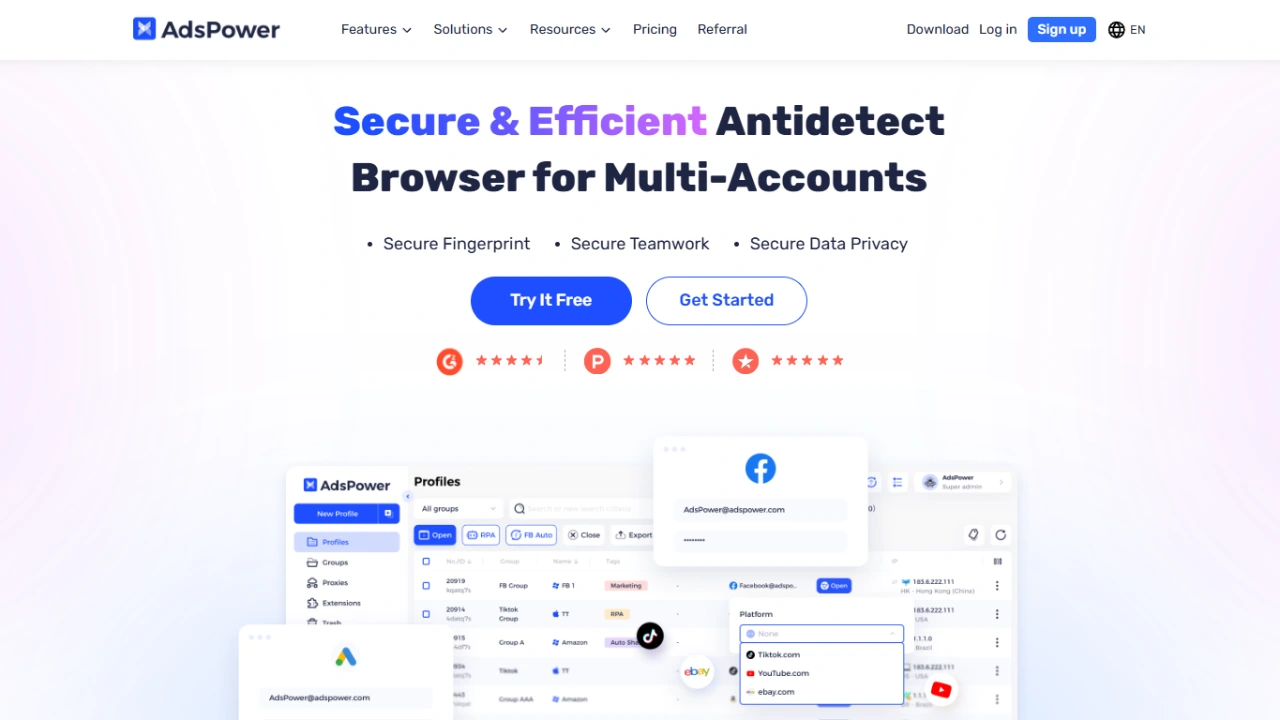
AdsPower is a professional anti-detect browser built for managing multiple online accounts from a single device. It creates distinct virtual browser environments — each with its own isolated cookies, local storage, cache, and a fully unique browser fingerprint. This isolation is what keeps platforms from linking and banning your accounts.
Founded and developed by SUNFLOWER TECH PTE. LTD. in Singapore, AdsPower has grown into one of the most widely used anti-detect browsers globally, particularly among affiliate marketers, e-commerce sellers, social media agencies, and crypto airdrop farmers.
Here's a quick snapshot of everything AdsPower offers:
| Features | Details |
|---|---|
| Product Name | AdsPower |
| Official Website | adspower.com |
| Developers | SUNFLOWER TECH PTE. LTD. |
| Company Headquarter | Singapore |
| Category | Anti-Detect Browser / Multi-Account Management |
| USPs | No-code RPA Automation, Profile Synchronizer, Dual-core browsers (Chromium & Firefox) |
| Best For | Affiliate Marketers, E-commerce Sellers, Social Media Agencies, Crypto Airdrop Farmers |
| Integrations | All major proxy providers (HTTP, HTTPS, SOCKS5), Local API for custom automation scripts |
| Support Options | 24/7 Live Chat, Email Support, Help Center |
| Documentation | Comprehensive Help Center with tutorials and guides |
| Starting Price | Free Plan (2 profiles). Paid plans from $5.40/month (billed annually) |
| Affiliate Program | Yes — 10% commission for 2 years |
| Money-Back Guarantee | No (but offers a permanent Free plan and a free trial of paid features) |
| Alternatives | Multilogin, GoLogin, Dolphin Anty, Incogniton, Octo Browser |
Who Is AdsPower For?
Before diving into features, it helps to understand whether AdsPower is actually built for your use case. Based on our research, here are the professionals who benefit most:
Affiliate Marketers & Media Buyers
Running multiple ad accounts on Facebook, Google, or TikTok is the bread and butter of affiliate marketing. AdsPower lets you maintain dozens or hundreds of independent ad accounts, each with its own profile and proxy, without triggering platform detection algorithms.
E-Commerce Sellers
Managing multiple storefronts on Amazon, eBay, Etsy, or Shopify requires account separation. AdsPower ensures each store appears to come from a distinct user — protecting your entire business from cross-account suspension.
Social Media Marketing Agencies
SMM agencies often manage tens or hundreds of client accounts across Instagram, Twitter/X, LinkedIn, and TikTok. AdsPower's team collaboration features make it easy to assign profiles to team members and track activity without sharing passwords.
Crypto & Web3 Airdrop Farmers
Farming multiple wallets and airdrop-eligible accounts requires separate digital identities. AdsPower's RPA automation can handle repetitive tasks (daily check-ins, token claims, on-chain interactions) across dozens of profiles without manual effort.
Web Scrapers & Data Professionals
While not a dedicated scraping tool, AdsPower is used by researchers and data teams to run browser-based scrapers across multiple profiles and IP addresses, bypassing rate limits and fingerprint-based blocks.
AdsPower Interface & Setup
Getting Started
Setting up AdsPower is straightforward:
- Download the AdsPower desktop client for Windows or macOS from the official website.
- Create an account and log in — no credit card required for the free plan.
- Click "New Profile" to create your first browser profile.
- Configure the profile settings: browser type (Sun or Flower), proxy details, and fingerprint parameters.
- Click "Open" to launch the isolated browser window.
The entire process takes under five minutes for a basic setup. Even without any technical background, the interface is clean enough to navigate without a tutorial.
Interface Layout
AdsPower uses a dashboard-style interface with a left sidebar for navigation. The main sections include:
- Profiles — Your central hub. All browser profiles live here, organized in customizable groups.
- Group Management — Organize profiles by campaign, client, or platform.
- RPA Robot — Build and manage your automation workflows.
- Team Members — Invite and manage team permissions.
- Proxy Manager — Store and reuse proxy credentials across profiles.
- Extensions — Manage Chrome/Firefox extensions shared across profiles.
The UI is available in multiple languages, including English, Chinese, Russian, Portuguese, and Vietnamese — reflecting AdsPower's global user base.
AdsPower Features — Deep Dive
AdsPower packs a serious feature set. Here's a detailed breakdown of every major capability.
1. Multi-Account Profile Management
The core of AdsPower is its ability to create and manage thousands of browser profiles. Each profile is a fully isolated environment with its own:
- Cookies and session data
- Local storage and IndexedDB
- Cache files
- Browser history
- Installed extensions
No data leaks between profiles. Opening profile A and profile B simultaneously doesn't let them see or interact with each other in any way. This isolation is enforced at the application level, not just the browser level.
You can organize profiles into custom groups — useful if you're managing separate clients, campaigns, or platforms. Profiles can be bulk-created using CSV import, which saves time when spinning up large-scale operations.
2. Advanced Browser Fingerprint Masking
AdsPower doesn't just hide your fingerprint — it replaces it with a real, unique, and consistent fingerprint for each profile. This is a critical distinction. Many cheap anti-detect browsers simply block fingerprint APIs, which itself is a red flag to platforms. AdsPower spoofs every parameter with plausible, real-world values.
Fingerprint parameters you can customize include:
- User Agent — The browser and OS identifier sent to every website
- WebRTC — Controls local IP leak prevention
- Canvas Fingerprint — A unique pixel-level rendering signature
- Audio Context — Audio processing fingerprint
- WebGL — Graphics card fingerprint
- Screen Resolution — Width, height, and color depth
- Fonts — The list of fonts detected by websites
- Language & Timezone — Automatically matched to your proxy's location
- Do Not Track — Toggle the DNT header
- Hardware Concurrency — Reported number of CPU cores
- Device Memory — Reported RAM amount
- Platform — Windows, Mac, Linux (reported OS)
- Plugins — Browser plugin list visible to websites
AdsPower also lets you import fingerprint data directly from real devices, which produces the most authentic profiles possible.
3. Dual Browser Cores: Sun Browser & Flower Browser
Unlike most anti-detect browsers that are Chromium-only, AdsPower offers two browser engines:
Sun Browser (Chromium-based): Compatible with all Chrome extensions and websites optimized for Chrome. This is the default choice for most use cases — Facebook ads, Google Ads, Amazon, e-commerce platforms.
Flower Browser (Firefox-based): Useful for platforms or automation workflows that have stronger Chromium detection, or where Firefox's rendering engine offers an advantage. Having Firefox available as a genuine option (not a fake) adds a layer of authenticity to your fingerprint.
The ability to mix Chromium and Firefox profiles in the same workspace is a meaningful differentiator over tools like GoLogin, Dolphin Anty, or Incogniton, which are Chromium-only.
4. No-Code RPA Automation
This is AdsPower's most distinctive feature and one of its strongest competitive advantages.
RPA (Robotic Process Automation) lets you record sequences of browser actions and replay them automatically — across one or many profiles. You don't write any code. You click a "Record" button, perform the actions manually, stop recording, and AdsPower saves it as a reusable script.
What you can automate:
- Account warm-up sequences (visit sites, scroll, click links, watch videos)
- Daily login and activity tasks
- Form filling and submission
- Social media interactions (likes, follows, comments)
- Crypto airdrop check-ins and token claims
- Posting content across platforms
- Checking account balances or order statuses
RPA scheduling: You can set automation scripts to run at specific times or on recurring schedules, so your accounts stay active and warmed up without manual intervention.
Cross-profile execution: Run the same script across 10, 50, or 500 profiles simultaneously. Each profile runs in isolation, so they don't interfere with each other.
This no-code RPA capability is something Multilogin doesn't offer natively (they require Selenium/Puppeteer scripts), and it puts AdsPower in a unique position for users who want powerful automation without a developer background.
5. Profile Synchronizer
The Synchronizer is a real-time mirroring tool that lets you control multiple browser profiles with a single mouse and keyboard.
How it works:
- Open multiple profiles simultaneously.
- Designate one as the "main" control profile.
- Every click, scroll, and keystroke you make in the control profile is instantly replicated across all synchronized profiles.
This is invaluable for tasks where you need to perform the same action on multiple accounts at the same moment — like claiming an airdrop that has a short availability window, posting the same content across multiple social accounts, or simultaneously withdrawing from multiple exchange accounts.
6. Team Collaboration & Role-Based Permissions
AdsPower was built with teams in mind from the start. The permission system is granular and practical:
- Profile Sharing: Share specific profiles or profile groups with team members without exposing login credentials.
- Role Assignment: Assign roles with different permission levels — some members can only view profiles, others can edit, and admins control everything.
- Activity Logs: A full audit trail of every action taken by every team member — who opened which profile, when, and what they did.
- Workspace Isolation: Team members only see the profiles shared with them, keeping client work separated.
This is particularly valuable for agencies managing client accounts. Clients can be given view-only access to their own profiles, while your internal team handles the work.
7. Flexible Proxy Integration
AdsPower doesn't sell proxies, but it integrates seamlessly with every proxy type and provider:
- HTTP / HTTPS proxies
- SOCKS5 proxies
- Rotating residential proxies
- Mobile (4G/5G) proxies
- Datacenter proxies
You can save proxy credentials in the Proxy Manager and reuse them across profiles, rather than re-entering credentials every time. Profiles can also be configured to automatically rotate proxies from a list.
Built-in Proxy Marketplace: AdsPower has an integrated marketplace where you can purchase residential and mobile proxy traffic directly within the app, from partner providers. This is convenient if you want a one-stop setup without separately sourcing proxies.
For a step-by-step walkthrough of pairing AdsPower with static ISP proxies, see our HypeProxies + AdsPower integration guide.
8. Browser Extensions Support
Both Sun Browser and Flower Browser support browser extensions. You can install Chrome extensions from the Chrome Web Store (in Sun Browser) or Firefox add-ons (in Flower Browser) directly within each profile. Extensions installed in one profile don't affect other profiles.
This is crucial for running tools like:
- MetaMask (crypto wallets)
- Ad blockers
- Cookie editors
- Session managers
- Platform-specific tools
9. Local API for Advanced Automation
For developers and technical users, AdsPower exposes a Local API that lets external scripts (Python, Node.js, etc.) control profiles programmatically. You can:
- Create and delete profiles via API
- Open and close profiles
- Integrate with Selenium or Puppeteer for custom automation
- Retrieve profile metadata
This makes AdsPower extensible for engineering teams who want to build custom workflows beyond what the no-code RPA supports.
10. Cookie Import/Export & Profile Transfer
You can import cookies into profiles in bulk — useful for warming up accounts or restoring sessions. Profiles (including all their settings and fingerprint data) can be exported and shared with other AdsPower users, making it easy to hand off work or back up configurations.
AdsPower Pricing 2026
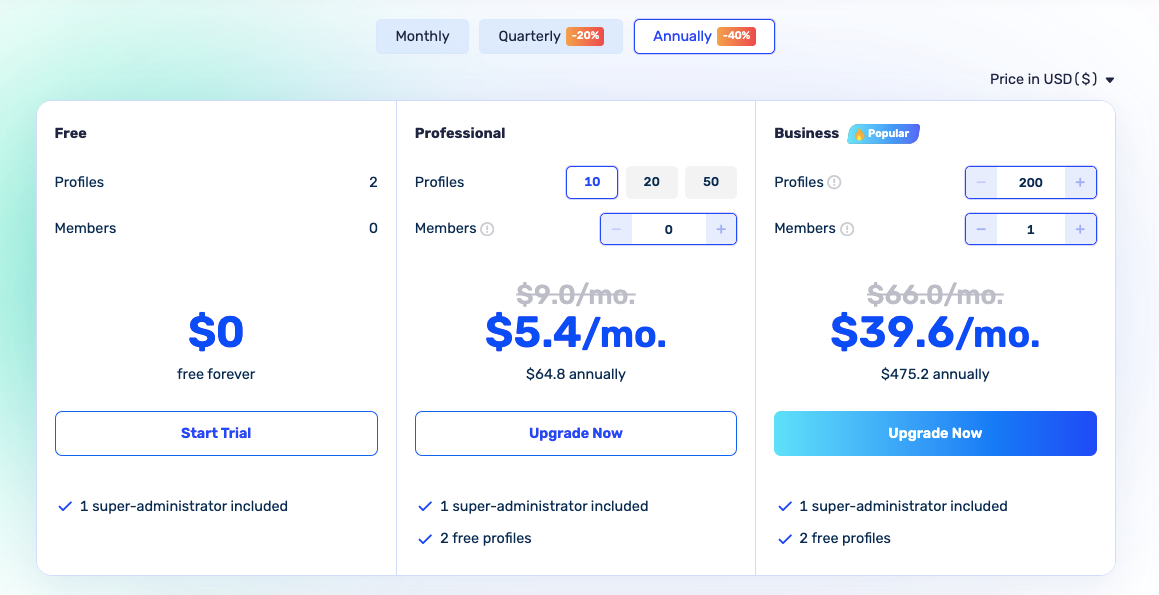
AdsPower's pricing is one of its strongest selling points. It's significantly more affordable than competitors like Multilogin (which starts at ~$99/month) while offering a comparable feature set. Plans scale from free to enterprise-level.
Plan Breakdown (Billed Annually)
| Plan | Monthly Price (Annual) | Profiles | Team Members | Key Inclusions |
|---|---|---|---|---|
| Free | $0/month | 2 | 2 | Profile management, basic fingerprint control |
| Base | $5.40/month | 10 | 1 | RPA automation, Synchronizer, Local API, profile import/export |
| Pro | $30.00/month | 100 | 5 | All Base features + advanced team permissions, activity logs, profile sharing |
| Custom / Enterprise | Contact sales | 1,000–10,000+ | Unlimited | All Pro features + dedicated support, custom onboarding |
Prices above reflect annual billing. Monthly billing is available at a higher rate. Quarterly billing is also an option at a mid-tier discount.
Add-On Profiles
If you need more profiles than your plan includes, AdsPower lets you purchase additional profile slots at an incremental cost — without upgrading your entire plan. This is particularly useful for agencies with fluctuating needs.
Which Plan Should You Choose?
Free Plan: Best for individuals testing the platform or managing just 2 accounts. The permanent free plan (not a time-limited trial) is a rare and genuine differentiator.
Base Plan ($5.40/month): The sweet spot for solo freelancers and small operators. At this price, getting RPA automation and the Synchronizer is exceptional value. Most competitors charge $20–$30/month for equivalent functionality.
Pro Plan ($30/month): Built for agencies and growing teams. The advanced permissions, activity logs, and higher profile limits are essential once you're managing more than a handful of accounts or collaborating with others.
Enterprise: For operations running thousands of profiles — large affiliate networks, major e-commerce sellers, or enterprise-scale data teams.
Limited Time Offer — Extra 5% Off AdsPower
Save an extra 5% on any AdsPower paid plan with code ProxyGraphy. Start managing multiple accounts safely at a lower cost today.
Exclusive Deal for ProxyGraphy Readers
ProxyGraphy readers get an exclusive extra 5% discount on any AdsPower plan. Apply code ProxyGraphy at checkout to save.
Top Discount Offer on AdsPower
Get an extra 5% off AdsPower Base, Pro, or Enterprise plans with code ProxyGraphy — the best discount available for new subscribers.
ProxyGraphy Special — Extra 5% AdsPower Discount
Don't pay full price. Use code ProxyGraphy at AdsPower checkout to save an extra 5% on any paid plan instantly.
AdsPower Security & Privacy
How Fingerprint Masking Works
Every time a browser visits a website, it sends hundreds of data points about itself: operating system, screen size, fonts, graphics card capabilities, time zone, language, and much more. Together, these form a fingerprint that's often unique enough to identify a user even without cookies or an IP address.
AdsPower intercepts these fingerprint APIs at the browser engine level and returns custom, consistent values for each profile. The key word is consistent — the same profile always reports the same screen size, the same fonts, the same canvas output. This consistency is what makes the fingerprint appear legitimate. A real device has consistent fingerprints; a poorly made spoof has random, incoherent values.
Fingerprint Checker Results
Anti-detect browser users commonly test their profiles against fingerprint detection tools like:
- Pixelscan.net
- BrowserLeaks.com
- CreepJS
- Whoer.net
In community testing and our own verification, AdsPower profiles pass all major fingerprint checkers when configured correctly with a matching proxy (timezone and geolocation matching the proxy's location).
Data Privacy
It's important to be transparent: AdsPower is developed by a Singapore-based company and is not subject to GDPR. This means:
- Your account data and profile metadata are stored on AdsPower's servers.
- Data is not subject to EU data protection regulations.
- Users handling sensitive European customer data should weigh this against their compliance requirements.
This is a genuine limitation — Multilogin, a European alternative, does offer GDPR compliance. For most affiliate marketers and e-commerce sellers, this isn't a practical concern, but it's worth noting.
AdsPower Performance
Resource Usage
Anti-detect browsers are inherently resource-intensive because each profile runs as a separate browser process. AdsPower is no exception.
Typical RAM usage:
- 1–5 profiles open: 1–3 GB RAM (normal for any browser)
- 10–20 profiles open simultaneously: 4–8 GB RAM
- 50+ profiles with RPA automation running: 16+ GB RAM recommended
Recommendations:
- For running up to 20 simultaneous profiles: 8 GB RAM minimum, 16 GB recommended
- For 50+ profiles: 32 GB RAM or a dedicated VPS/cloud machine
- Consider using AdsPower's headless mode or cloud-based execution for large-scale automation
Stability
AdsPower's desktop client is stable for most day-to-day use. Occasional slowdowns can occur when launching many profiles rapidly, but this is a hardware constraint rather than a software bug. The application auto-updates in the background and rarely requires manual intervention.
Platform Bypass Rate
Based on community reports and our testing:
- Facebook/Meta: High success rate with properly configured residential proxies and warmed-up profiles.
- Google/YouTube: Consistently good results, especially with matching timezone and language settings.
- Amazon: Reliable separation when each profile uses a unique, clean residential IP.
- TikTok: Good performance; mobile proxy use is recommended for best results.
No anti-detect browser is 100% undetectable indefinitely. Detection algorithms evolve continuously. AdsPower updates its browser cores regularly to maintain bypass rates, and the dual-core architecture means they're not locked into a single attack surface.
AdsPower vs. Competitors
AdsPower vs. Multilogin
| AdsPower | Multilogin | |
|---|---|---|
| Starting Price | Free (2 profiles); paid from $5.40/mo | Trial for €1.99; paid from ~$99/mo |
| Free Plan | Yes — permanent | No |
| Browser Cores | Chromium (Sun) + Firefox (Flower) | Chromium (Mimic) + Firefox (Stealthfox) |
| No-Code Automation | Yes — built-in RPA recorder | No — API only (Selenium/Puppeteer) |
| Synchronizer | Yes | No |
| GDPR Compliance | No | Yes |
| Team Collaboration | Yes | Yes |
| Local API | Yes | Yes |
| Best For | Marketers, e-commerce, agencies, crypto | Enterprise, high-security, European users |
Verdict: Multilogin is the gold standard for fingerprinting quality and GDPR compliance, but it's 10–20x more expensive than AdsPower. For most marketers and operators, AdsPower delivers 90% of the protection at a fraction of the cost.
AdsPower vs. GoLogin
| AdsPower | GoLogin | |
|---|---|---|
| Starting Price | Free (2 profiles); paid from $5.40/mo | Free (3 profiles); paid from $24/mo |
| Browser Cores | Chromium + Firefox | Chromium (Orbita) only |
| No-Code Automation | Yes — built-in RPA | Limited |
| Synchronizer | Yes | No |
| Cloud Profiles | No | Yes |
| Mobile App | No | Yes (Android) |
| Best For | Power users, automation, teams | Beginners, SMM, simple use cases |
Verdict: GoLogin is more beginner-friendly and adds cloud-based profile storage and a mobile app. AdsPower wins on automation depth and browser flexibility.
AdsPower vs. Dolphin Anty
| AdsPower | Dolphin Anty | |
|---|---|---|
| Starting Price | Free (2 profiles); paid from $5.40/mo | Free (10 profiles); paid from $89/mo (Base) |
| Browser Cores | Chromium + Firefox | Chromium only |
| No-Code Automation | Yes — full RPA | Limited (Smart Paste only) |
| Synchronizer | Yes | No |
| Free Profiles | 2 | 10 |
| Best For | All-around use | Facebook/TikTok media buyers |
Verdict: Dolphin Anty offers more free profiles but charges significantly more on paid plans. Its automation is more limited. AdsPower is the better long-term value for teams needing automation.
AdsPower Alternatives
While AdsPower is a top contender in the anti-detect browser space, here's how the full landscape compares:
| Browser | Starting Price | Browser Core(s) | Key Automation | Best For |
|---|---|---|---|---|
| Multilogin | ~$99/mo (no free plan) | Chromium (Mimic) + Firefox (Stealthfox) | API only — Selenium/Puppeteer; AI Quick Actions | Enterprise, GDPR-compliant ops, highest-security needs |
| GoLogin | Free (3 profiles); $24/mo paid | Chromium (Orbita) | Limited API support | Beginners, SMM, cloud-based profile storage |
| Dolphin Anty | Free (10 profiles); $89/mo paid | Chromium only | Smart Paste; basic automation | Facebook/TikTok media buyers |
| Incogniton | Free (10 profiles); $19.99/mo paid | Chromium only | Selenium/Puppeteer, Synchronizer, human-typing paste | Budget users needing a generous free tier |
| Octo Browser | €29/mo (10 profiles, no free plan) | Chromium only | API access for automation | Technical users, affiliate marketing, web scraping |
| Kameleo | €59/mo (no free plan) | Chromium + Firefox + Mobile | Selenium/Puppeteer; mobile profile support | Mobile fingerprinting, iOS/Android emulation |
| Undetectable.io | Free (5 profiles); $49/mo paid | Chromium only | Cloud automation, Selenium | Cloud-first teams, distributed automation |
Key takeaway: AdsPower offers the best balance of price, automation capability, and browser flexibility in this space. The only category where it falls short is GDPR compliance (Multilogin) and free profile count (Incogniton at 10 free vs. AdsPower's 2 free).
AdsPower Pros & Cons
No tool is perfect. Here is an honest assessment based on real-world use:
Pros
- Exceptional automation depth: The no-code RPA and Synchronizer are genuine time-savers unavailable at this price anywhere else.
- Very affordable: Starting at $5.40/month for paid plans, it's 5–20x cheaper than comparable tools like Multilogin or Dolphin Anty.
- Permanent free plan: 2 profiles forever — not a time-limited trial. Rare in this market.
- Dual browser cores: Chromium + Firefox support gives real flexibility and authenticity.
- Strong team features: Granular permissions, profile sharing, and activity logs make it genuinely agency-ready.
- Active development: Frequent updates to browser cores and fingerprint parameters to maintain bypass effectiveness.
- 24/7 live chat support: Responsive and helpful — well-reviewed by users across Reddit, Trustpilot, and community forums.
- Bulk profile creation: CSV import and group management at scale.
- Integrated proxy marketplace: Convenient for sourcing proxies without leaving the app.
Cons
- Learning curve for RPA: The no-code RPA is powerful but takes time to master for non-technical users.
- No GDPR compliance: Data isn't processed under EU data protection rules — a concern for some European operations.
- Requires external proxies: AdsPower doesn't include proxies in its plans (though the marketplace helps). Budget separately.
- Resource-heavy at scale: Running many simultaneous profiles demands significant RAM and CPU — plan your hardware accordingly.
- No mobile client: Unlike GoLogin, there's no mobile app for iOS or Android.
- No cloud profiles: Profiles are stored locally (desktop client). If your machine dies, so do your profiles (unless backed up).
Real User Reviews of AdsPower
AdsPower has built a strong reputation across online communities. Here's a summary of what real users consistently report:
On Reddit (r/antidetect, r/dropshipping, r/CryptoCurrency):
- Users frequently recommend AdsPower as the best value anti-detect browser for solo operators.
- The RPA automation gets the most praise from crypto airdrop farmers managing 50–200 profiles.
- Common complaint: RAM usage when running large numbers of profiles simultaneously.
On Trustpilot:
- Generally positive reviews, with users highlighting the support quality and ease of getting started.
- Occasional complaints about the learning curve for advanced features like RPA setup.
On Product Hunt and G2:
- Praised for its value-for-money positioning relative to Multilogin and GoLogin.
- Teams report the collaboration features work well in practice, with activity logs being particularly appreciated by managers.
Community verdict: AdsPower is widely considered the best entry-to-mid-level anti-detect browser for price-conscious users who need real automation capabilities, not just basic profile isolation.
How to Get Started with AdsPower
Step 1: Download & Install
Go to adspower.com and download the client for Windows or macOS. Installation is straightforward — standard installer, no command line required.
Step 2: Create Your Account
Sign up with your email. The free plan activates immediately — no credit card required.
Step 3: Create Your First Profile
Click "New Profile", then configure:
- Name and Group: Organize profiles from the start.
- Browser Type: Choose Sun Browser (Chromium) or Flower Browser (Firefox).
- Proxy: Enter your proxy details (host, port, username, password). Always use a proxy for real account management.
- Fingerprint: Either use AdsPower's auto-generated fingerprint or customize individual parameters.
Step 4: Launch and Test
Click "Open" to launch the profile. Once open, visit a fingerprint testing site like pixelscan.net or browserleaks.com to verify your fingerprint and proxy are working correctly.
Step 5: Set Up Automation (Optional)
Navigate to RPA Robot → New Task, click Record, perform your desired actions, stop recording, and save. You can now run this task across any number of profiles on a schedule.
Quick Walkthrough: Adding Proxies in AdsPower
AdsPower provides the isolated browser profile and unique fingerprint — but each profile also needs its own IP address to be truly separate. That's the role of a proxy. We recommend pairing AdsPower with static ISP proxies for the best results — check our HypeProxies + AdsPower setup guide for a full walkthrough with screenshots. Here's the quick version:
Step 1: Create a New Profile
Open AdsPower and click "New Profile" in the top-right of the main dashboard to open the profile creation window.
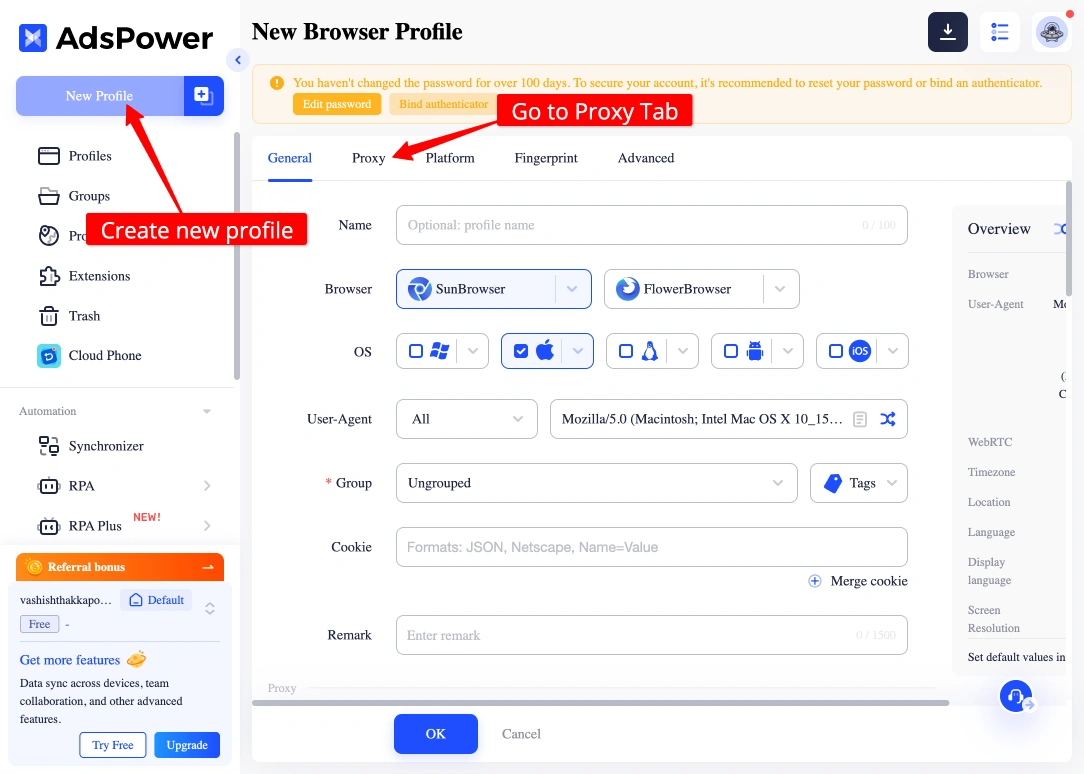
Give the profile a name that helps you identify which account and IP it belongs to — for example, "Amazon Store 1" or "FB Ad Account 03."
Step 2: Navigate to the Proxy Section
Scroll down in the profile creation window until you reach the Proxy section. This is where you configure the IP routing for this profile's browser traffic.
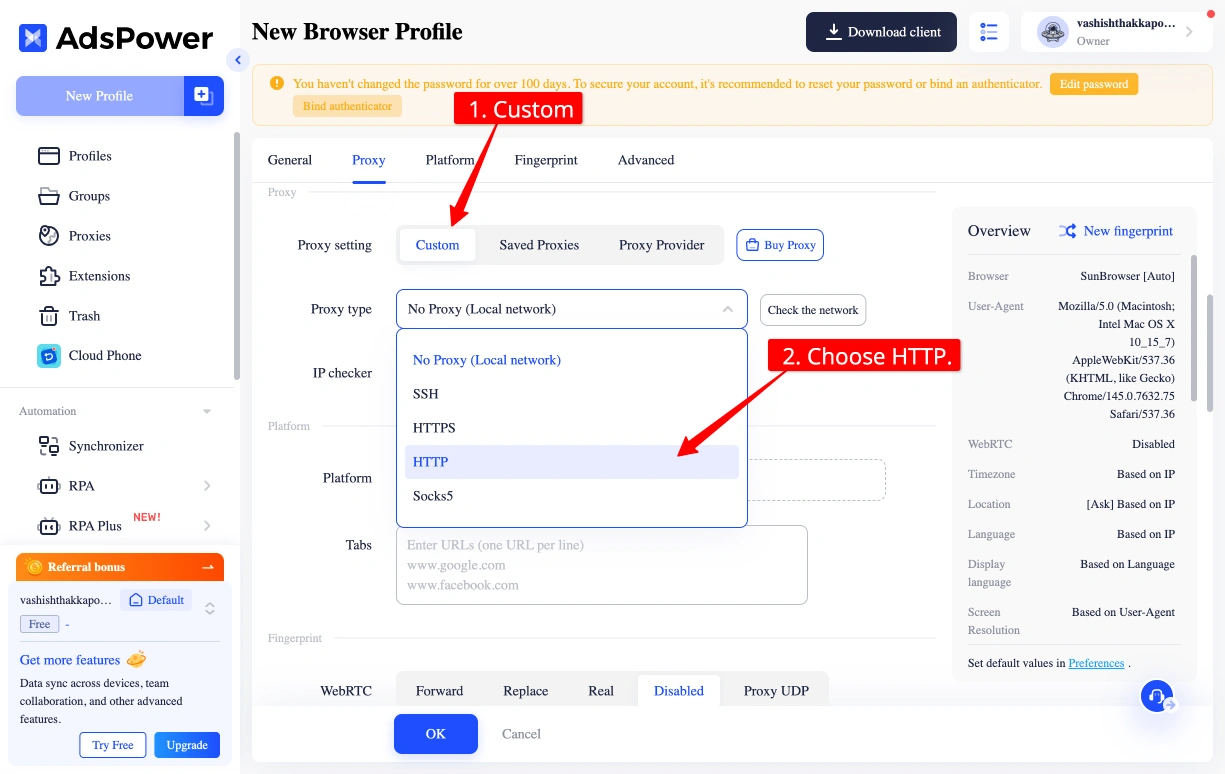
The default setting is typically "No Proxy" — you'll need to switch this to match your proxy provider's protocol.
Step 3: Select SOCKS5 (Recommended)
Click the proxy type dropdown and choose SOCKS5. SOCKS5 is the preferred option because it routes all traffic — including DNS queries — through the proxy, which prevents DNS leaks that could expose your real location. If your network blocks SOCKS5, fall back to HTTP.
Step 4: Enter Your Proxy Credentials
Fill in the four fields using the credentials from your proxy provider:
- Proxy Host — the IP address or hostname
- Proxy Port — the port number
- Proxy Username — your authentication username
- Proxy Password — your authentication password
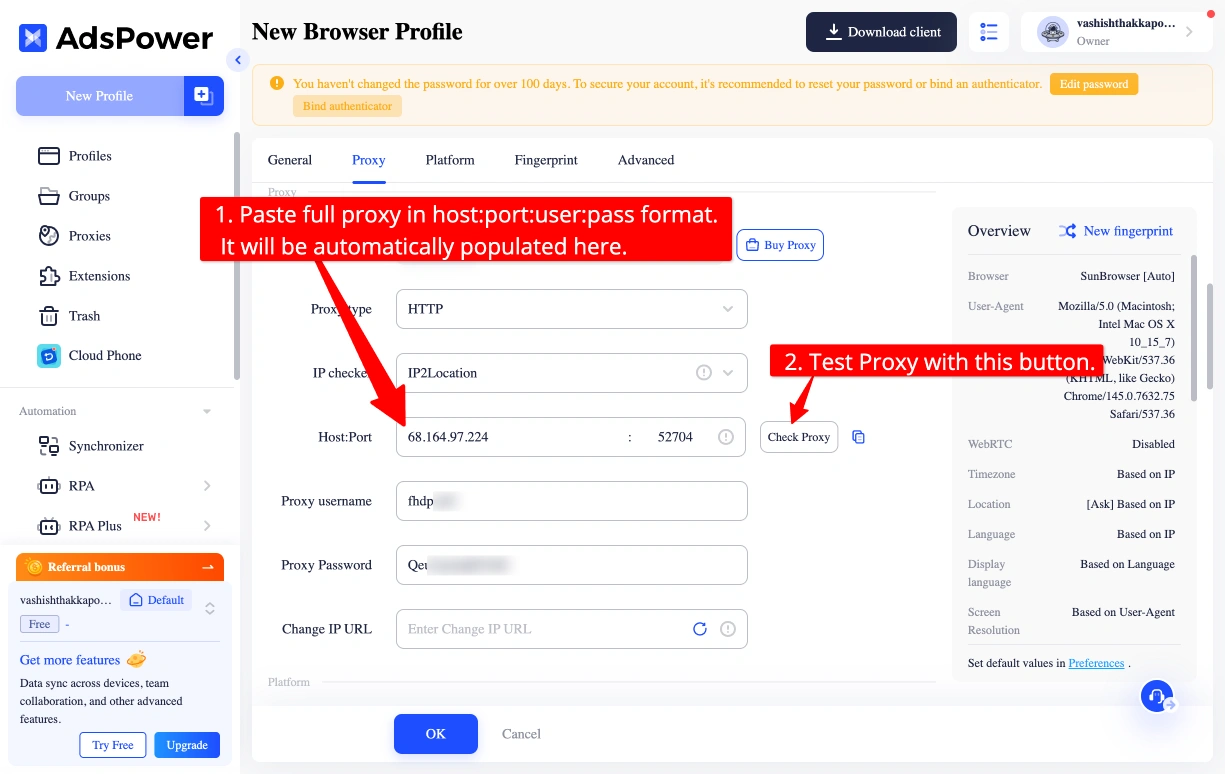
Assign one unique IP per profile. Never share an IP across two profiles — that's the single most common reason accounts get linked and banned together.
Step 5: Click "Check Proxy" to Verify
Before saving, click the "Check Proxy" button. AdsPower will test the connection and display the detected IP address, country, and status.
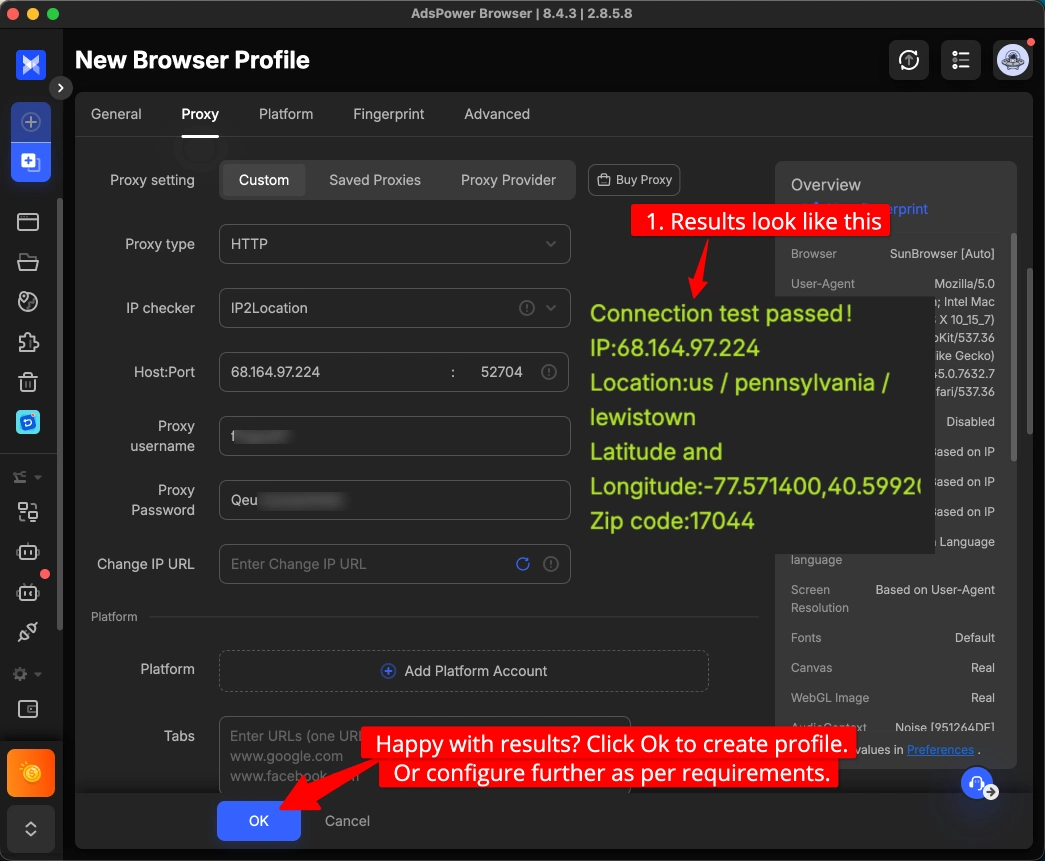
A green result means the proxy is working correctly. If it fails, double-check that there are no typos in the credentials and that the port matches the protocol you selected.
Step 6: Save and Open the Profile
Click "Save" to finalize the profile. Back on the dashboard, click "Open" to launch the browser window. All traffic from that window now flows through your assigned proxy.
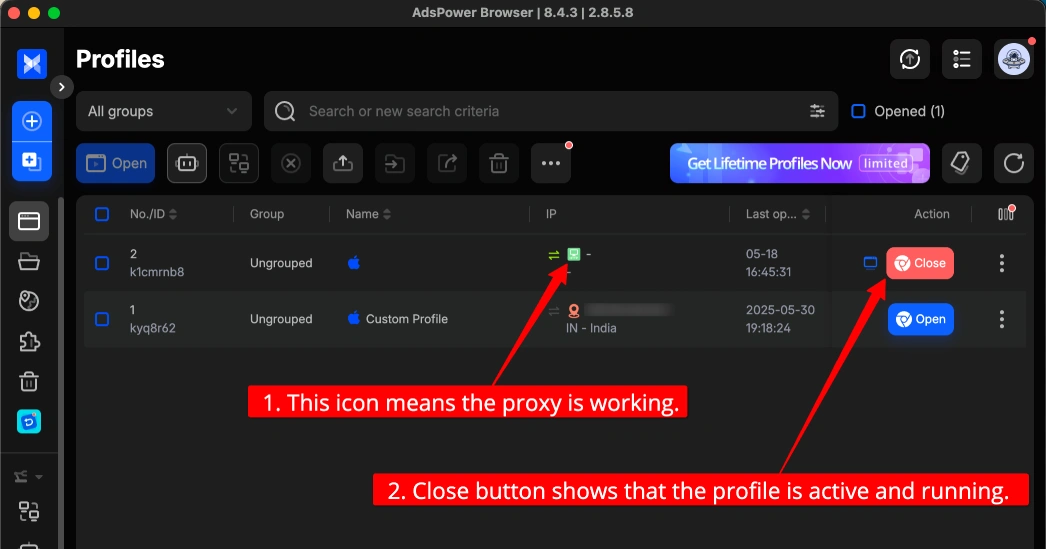
Repeat this process for every profile — one unique IP per profile, every time.
Tip: For the best results on social media and e-commerce platforms, use static residential or ISP proxies rather than rotating ones. Static IPs maintain a consistent identity across sessions, which is what platforms expect from real users.
See our full HypeProxies + AdsPower integration guide for a complete step-by-step walkthrough using ISP proxies.
AdsPower FAQs
What is AdsPower used for?
AdsPower is used to manage multiple online accounts securely without getting banned. Main use cases include affiliate marketing (multiple ad accounts), e-commerce (multiple Amazon/eBay/Etsy stores), social media marketing, crypto airdrop farming, and any work requiring separate, non-linked browser profiles.
Is AdsPower safe to use?
Yes, AdsPower is safe for its intended purpose. It protects you from platform detection by masking your browser fingerprint. Your traffic is still routed through your proxy, so using high-quality residential proxies is essential for complete security.
Is AdsPower legit?
AdsPower is a legitimate, commercially operating company (SUNFLOWER TECH PTE. LTD., Singapore) that has been in operation since 2019. It has tens of thousands of paying customers and is widely reviewed and used in the affiliate marketing, e-commerce, and crypto communities.
Does AdsPower have a free trial?
AdsPower offers a permanent free plan that includes 2 browser profiles — not a time-limited trial. You can use it indefinitely. They also offer free trials of paid plan features for registered users.
How many profiles can I create with AdsPower?
The free plan includes 2 profiles. Paid plans range from 10 profiles (Base) to 10,000+ on custom enterprise plans. Additional profile slots can be purchased as add-ons on any paid plan.
Does AdsPower work with residential proxies?
Yes. AdsPower works with all proxy types including residential, datacenter, mobile (4G/5G), and ISP proxies. It supports HTTP, HTTPS, and SOCKS5 protocols. For best results on social media platforms, residential proxies are recommended.
What is the difference between AdsPower and a VPN?
A VPN only changes your IP address. AdsPower changes your entire browser fingerprint — fonts, screen size, graphics card, user agent, canvas rendering, and more — in addition to working with your proxy for IP change. For multi-account management, a VPN alone is not sufficient; platforms will still fingerprint your browser and link your accounts.
Do I still need proxies with AdsPower?
Yes. AdsPower provides the unique browser profile and fingerprint. Your proxy provides the unique IP address. You need both to appear as a completely distinct user to any platform.
What is RPA in AdsPower?
RPA stands for Robotic Process Automation. It's AdsPower's built-in no-code automation tool. You record sequences of browser actions (clicks, typing, scrolling, form submission) and replay them automatically across one or many profiles — without writing any code.
Can AdsPower be detected by platforms?
No anti-detect browser is 100% undetectable indefinitely. Detection algorithms at Facebook, Google, and Amazon evolve constantly. AdsPower counters this by regularly updating its browser cores and fingerprinting parameters. When properly configured with matching proxy settings, AdsPower passes all major fingerprint detection checks. The risk of detection is significantly lower than using a standard browser, VPN, or basic proxy.
Is AdsPower GDPR compliant?
No. AdsPower is a Singapore-based company and does not fall under GDPR jurisdiction. If you operate in the EU and handle European customer data, consider Multilogin as a GDPR-compliant alternative.
How does AdsPower compare to Multilogin?
Multilogin offers superior fingerprinting quality, GDPR compliance, and enterprise-grade reliability, but costs 10–20x more. AdsPower delivers comparable practical performance for most use cases at a fraction of the price. The key AdsPower advantage is built-in no-code RPA automation, which Multilogin doesn't offer natively.
What operating systems does AdsPower support?
AdsPower has desktop clients for Windows (7, 8, 10, 11) and macOS. There is no Linux client or mobile app.
Is AdsPower Worth It? Final Verdict 2026
After deep analysis of its features, real-world testing, user community feedback, and comparison against every major competitor, our conclusion is clear: AdsPower is the best-value anti-detect browser available in 2026 for the majority of users.
Here's why:
If you're a solo marketer or freelancer: The Base plan at $5.40/month delivers RPA automation, the Synchronizer, and Local API access — features that cost 5–10x more with competitors. It's an easy decision.
If you run a team or agency: The Pro plan's collaboration features, granular permissions, and activity logs are genuinely enterprise-quality at a mid-market price. The ability to share profiles without sharing passwords is invaluable.
If you're just exploring: The permanent free plan with 2 profiles is a real no-risk way to evaluate the tool before committing a dollar.
The only scenario where AdsPower isn't the right call: If you operate under GDPR and handle EU customer data (choose Multilogin), or if you need a cloud-based solution without a desktop client (consider GoLogin or Undetectable.io).
For everyone else — affiliate marketers, e-commerce operators, social media agencies, and crypto farmers — AdsPower delivers advanced anti-detection, powerful automation, strong team tools, and reliable performance at a price point that's genuinely hard to beat.
Rating: 4.5/5